
Building macOS Apps with an AI Development Team: A Framework That Actually Works
How we built a structured AI development framework using specialized agents, quality gates, and persistent memory to build MetaScope, a professional macOS app in 6 months.

Six months ago, I started a journey to see exactly how far AI could push my development workflow. From the early days of chat-based debugging to deep-diving into Cursor and OpenAI’s Codex, I’ve tested the limits of what’s possible. Today, I’m back in the CLI with Claude Code, and the transformation is night and day.
The result of this “ride” is MetaScope, a professional-grade macOS app built for the demanding needs of photographers. By leveraging the incredible improvements made in AI over the last six months, I’m now shipping at lightning velocity.
But code is only half the battle. To reach this speed without sacrificing quality, I had to stop treating AI as a chatbot and start treating it as a structured development team. Here is how I built that framework.
This is the story of that framework, and how you can use it for your own projects.
The Problem: AI Is Capable But Chaotic
Early in the MetaScope project, I noticed a pattern. Claude could write excellent Swift code. It understood SwiftUI patterns, macOS conventions, and even obscure ExifTool quirks. But there were problems:
Context Loss Every conversation started fresh. Decisions made in previous sessions evaporated. We’d discuss architectural choices, agree on a pattern, and then, next session, the same discussion would happen again.
Inconsistent Quality Some days, the code was brilliant. Other days, shortcuts appeared. Force unwraps. Missing error handling. Undocumented APIs. There was no consistent standard.
Documentation Drift The code would change, but documentation wouldn’t. Help content described features that no longer existed. Release notes missed important updates. Architecture docs became archaeology.
Scope Creep “While we’re here, let’s also…” became a recurring theme. Features would expand. Technical debt accumulated. Releases slipped.
Sound familiar? These aren’t AI problems, they’re development problems. And they have development solutions.
The Solution: A Framework, Not a Chat
The breakthrough came when I stopped treating AI as a conversation partner and started treating it as a development team member. Team members have:
- Defined responsibilities (not everything is everyone’s job)
- Quality standards (gates that work must pass through)
- Institutional knowledge (decisions persist across time)
- Structured communication (reports, documents, not just chat)
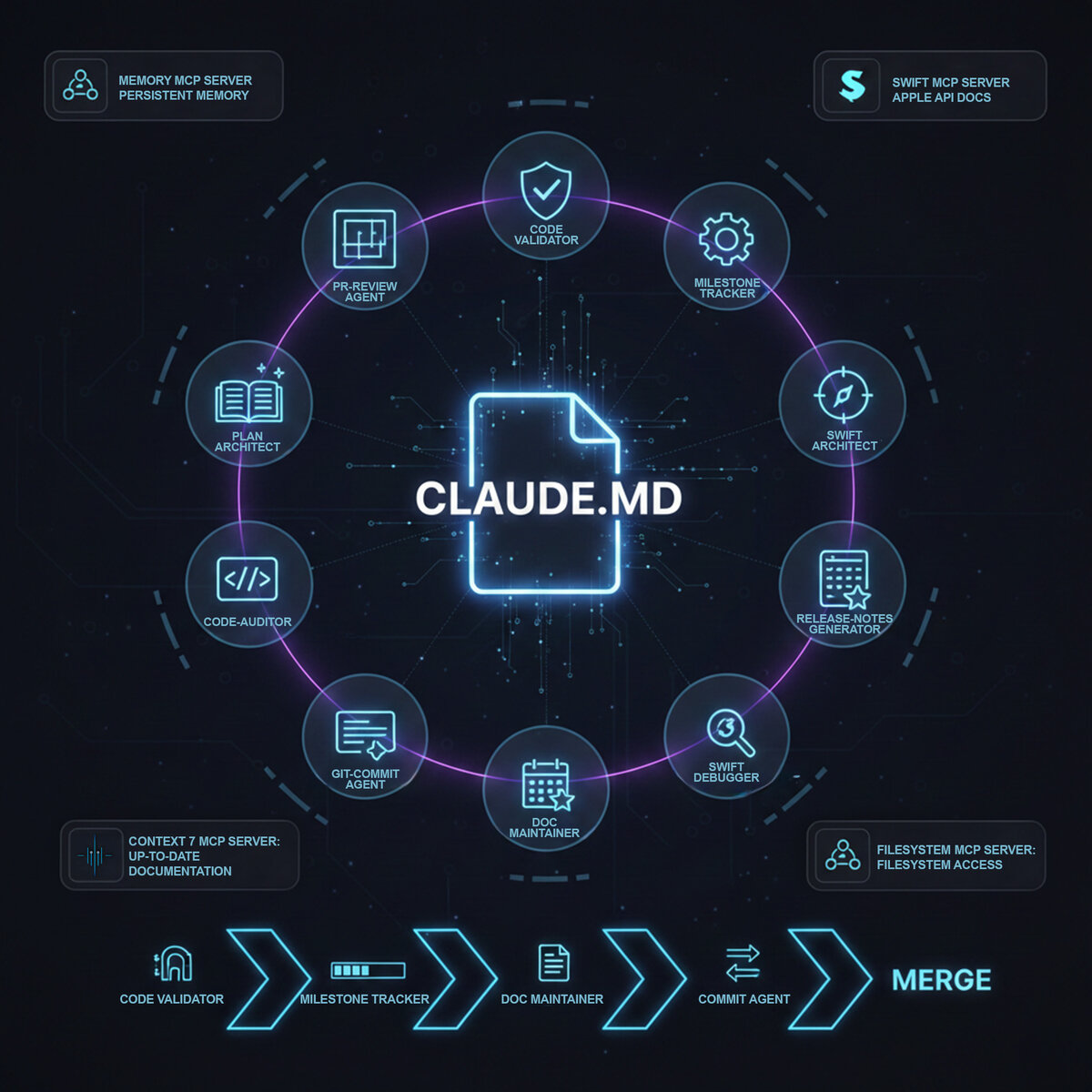
Here’s what the framework looks like:
The Hub: CLAUDE.md
Every project needs a central guidance document. Not a README (that’s for humans reading GitHub), but an operational playbook for the AI. Mine includes:
## MANDATORY GATES (BLOCKING)

### Planning Gate
Create documented plan BEFORE any code changes.

| Scope | Document |
|-------|----------|
| Major (>5 days) | RFC in docs/developer/decisions/ |
| Medium (2-5 days) | Implementation plan |
| Small (<2 days) | Commit message plan |

### Quality Gate
- No force unwraps in production code
- Error cases handled with user feedback
- Public APIs have documentation
- No TODO without issue reference

### Testing Gate
Tests MUST pass before commits.

### PR Review Gate
All review feedback addressed before merge.
These aren’t suggestions. They’re blocking requirements. The AI is instructed to refuse commits that violate gates, to escalate uncertainty, and to ask rather than assume.
The Team: Specialized Subagents
Here’s where it gets interesting. Claude Code supports “subagents”, specialized AI instances with focused expertise. Instead of asking one AI to do everything, I defined ten specialists:
| Agent | Role | When Invoked |
|---|---|---|
| plan-architect | Creates implementation plans | Before any medium+ feature |
| code-validator | Checks quality gates | Before every commit |
| github-commit-agent | Stages, commits, pushes | After validation passes |
| pr-review-agent | Senior code review | Before merge |
| documentation-maintainer | Keeps docs synchronized | After feature completion |
| milestone-tracker | Updates project plans | After feature completion |
| macos-swift-architect | Architecture guidance | When design questions arise |
| macos-swift-debugger | Debugging expertise | When stuck for >1 attempt |
| code-auditor | Pattern consistency | Before major refactors |
| release-notes-generator | Documents releases | After feature completion |
The key insight: automatic invocation. I don’t ask Claude to run the validator, it runs automatically before every commit. I don’t request documentation updates, the documentation-maintainer triggers when features complete.
This creates a workflow that mirrors professional development teams:
code-validator → [milestone-tracker | doc-maintainer] → commit-agent → pr-review-agent → mergeThe Memory: Persistent Knowledge
Context loss is solved through two mechanisms:
MCP Memory Server A knowledge graph that persists across sessions. Decisions, patterns, and architectural choices live here. When a session starts:
mcp__memory__search_nodes("v1.2.1 current work")The AI retrieves relevant context from previous sessions. When decisions are made:
mcp__memory__add_observations({
  entityName: "window-sizing-pattern",
  contents: ["All windows minimum 480x400", "Use frameAutosaveName for persistence"]
})
They persist for future sessions.
Session Checkpoints Before context compaction (when the conversation gets too long), state is captured:
# Session Checkpoint - 2024-12-24

## Git State
- Branch: dev/v1.2.1
- Last commit: f4bf180

## Completed This Session
- Export settings audit
- CLLocationManager fix

## Key Decisions
- Using synchronous loading for export folder to prevent nil on first render

## Next Steps
1. Window sizing pattern audit
2. Multi-file drag export
The next session starts by reading this checkpoint. No decision is truly lost.
The Expertise: Swift MCP Server
For macOS development, there’s a specific challenge: Apple’s APIs change constantly. New frameworks appear. Old patterns become deprecated. Training data has a cutoff date.
The solution is an MCP server specifically for Swift documentation. It has access to:
- Latest Apple API documentation (including macOS 26/Liquid Glass features)
- Swift Evolution proposals
- Human Interface Guidelines
- Swift Programming Language book
When the AI needs API information:
mcp__swift__swift_symbol_lookup("NSWindow")It gets current documentation, not potentially outdated training knowledge.
The Framework in Practice
Let me walk through a real scenario: adding batch watermarking to MetaScope.
Phase 1: Planning (plan-architect)
I describe the feature. Instead of jumping to code, the plan-architect agent produces:
# Implementation Plan: Batch Watermarking

## Goal
Allow users to apply text or image watermarks to multiple files simultaneously.

## Approach
Extend existing BatchProcessingService with watermark operations.

## Phases
1. Watermark configuration UI (2 days)
2. Single-file watermark engine (2 days)
3. Batch integration (1 day)
4. Preview system (1 day)

## Dependencies
- CoreImage for watermark compositing
- Existing BatchProcessingService
- Export settings for output format

## Tests
- Unit: Watermark positioning calculations
- Integration: Batch processing with watermarks
- UI: Preview matches final output

## Acceptance Criteria
- Users can configure text/image watermarks
- Watermarks apply to 100+ files in reasonable time
- Preview accurately represents final result
This plan is reviewed. Adjusted if needed. Then, and only then, does implementation begin.
Phase 2: Implementation (with quality gates)
As I implement each phase, the code-validator runs before every commit:
## Validation Report

**Status**: FAIL

### Blocking Issues
- Force unwrap at WatermarkEngine.swift:47, use guard let
- Missing tests for watermark positioning

### Non-Blocking Issues
- WatermarkConfiguration missing /// documentation

**Ready to commit**: NO
The commit is blocked until issues are resolved. No exceptions.
Phase 3: Documentation (documentation-maintainer)
When Phase 1 completes, the documentation-maintainer automatically triggers:
- Updates release notes with “Added watermark configuration”
- Adds help content for the watermark settings panel
- Updates the feature matrix in developer docs
- Syncs the milestone plan checkbox
I don’t write documentation manually. I don’t even request it. The agent knows the feature is complete (from the milestone tracker) and updates all documentation layers.
Phase 4: Review (pr-review-agent)
Before merging, the PR review agent performs a senior review:
## PR Review Report

### Critical Issues
(none)

### Important Issues (Should Fix)
- WatermarkEngine.applyWatermark() doesn't handle zero-size images

### Suggestions
- Consider caching CIFilter instances for batch performance

### Positive Observations
- Clean separation between configuration and application
- Proper Task cancellation handling

**Verdict**: APPROVE (with suggested fix)
The important issue creates a TodoWrite item. It’s tracked and fixed before merge.
Results: What This Framework Delivers
After 6 months of development:
Quantifiable Outcomes
| Metric | Observation |
|---|---|
| Code Quality | Zero production crashes from force unwraps |
| Documentation | 100+ synchronized docs, always current |
| Planning | 12 RFCs, 11 ADRs for major decisions |
| Testing | Comprehensive test suite, gates prevent regression |
| Session Continuity | Decisions persist across 100+ sessions |
Qualitative Outcomes
Reduced Cognitive Load I don’t track what documentation needs updating. I don’t remember every architectural decision. The framework handles it.
Consistent Quality Whether I’m tired, rushed, or in flow state, the gates apply. Quality doesn’t depend on my current focus.
Knowledge Preservation Six months later, I can understand why we chose a particular pattern. It’s documented. In Memory. In RFCs.
Faster Onboarding New features start with context. The skill guide navigates the codebase. Patterns are documented with examples.
How to Adopt This Framework
Start Small
You don’t need all ten agents on day one. Start with:
- CLAUDE.md, Define your quality gates
- code-validator, Automated quality checks before commits
- github-commit-agent, Consistent commit formatting
Add agents as needs emerge.
Customize for Your Stack
This framework was built for macOS/Swift. The structure is universal:
- The hub document (CLAUDE.md)
- Specialized agents with clear triggers
- Quality gates that block progress
- Persistent knowledge management
- Multi-layer documentation
The content adapts to your technology:
- React? Create a component-patterns agent
- Backend? Create an API-design agent
- Mobile? Create platform-specific debuggers
Invest in the Skill Guide
The navigation skill is underrated. When the AI can quickly find:
- Where code lives
- What patterns to follow
- How systems connect
- What decisions were made
…development velocity increases dramatically.
Enforce the Gates
Gates only work if they’re enforced. Configure your CLAUDE.md to make violations blocking. Train yourself to not override them “just this once.”
The Bigger Picture
This framework represents a shift in how we think about AI-assisted development. It’s not about AI writing code for us. It’s about AI as a force multiplier for professional practices we already know work:
- Planning before coding (now with an architect agent that never forgets patterns)
- Code review (now with a reviewer that checks every commit, not just some)
- Documentation (now with a maintainer that never gets lazy)
- Quality gates (now with a validator that doesn’t make exceptions)
The AI isn’t replacing developers. It’s eliminating the friction that prevents us from doing what we know we should: plan thoroughly, review carefully, document completely, maintain quality consistently.
Conclusion
Building MetaScope with this framework taught me that AI-assisted development isn’t about how smart the AI is, it’s about how well you structure its work. A brilliant developer without process produces chaos. A capable AI with strong process produces quality.
The framework isn’t magic. It’s discipline, encoded. It’s quality gates that can’t be bypassed. It’s documentation that can’t be forgotten. It’s decisions that can’t be lost.
If you’re building macOS applications (or any complex software) with AI assistance, consider this: the bottleneck isn’t AI capability. It’s AI orchestration. Get the framework right, and everything else follows.
MetaScope is a professional metadata editor for macOS, available on the Mac App Store. Built with Swift, SwiftUI, in 6 months of AI-assisted development.
Appendix: Quick Start Checklist
For developers who want to adopt this framework:
- Create CLAUDE.md with mandatory gates
- Define code-validator agent
- Define github-commit-agent
- Set up .claude/checkpoints/ directory
- Create project skill guide
- Configure MCP servers (Swift, Memory)
- Document core architecture
- Create first RFC for a medium feature
- Run for two weeks, iterate based on friction points
The framework will evolve with your project. Start with structure, add sophistication as patterns emerge.
Questions or feedback? Reach out to Zalo Design Studio.