Creating Professional Photo Portfolios Without Design Software
MetaScope turns a tight selection into a branded PDF or self-contained HTML gallery in minutes, without asking you to become a part-time layout designer.
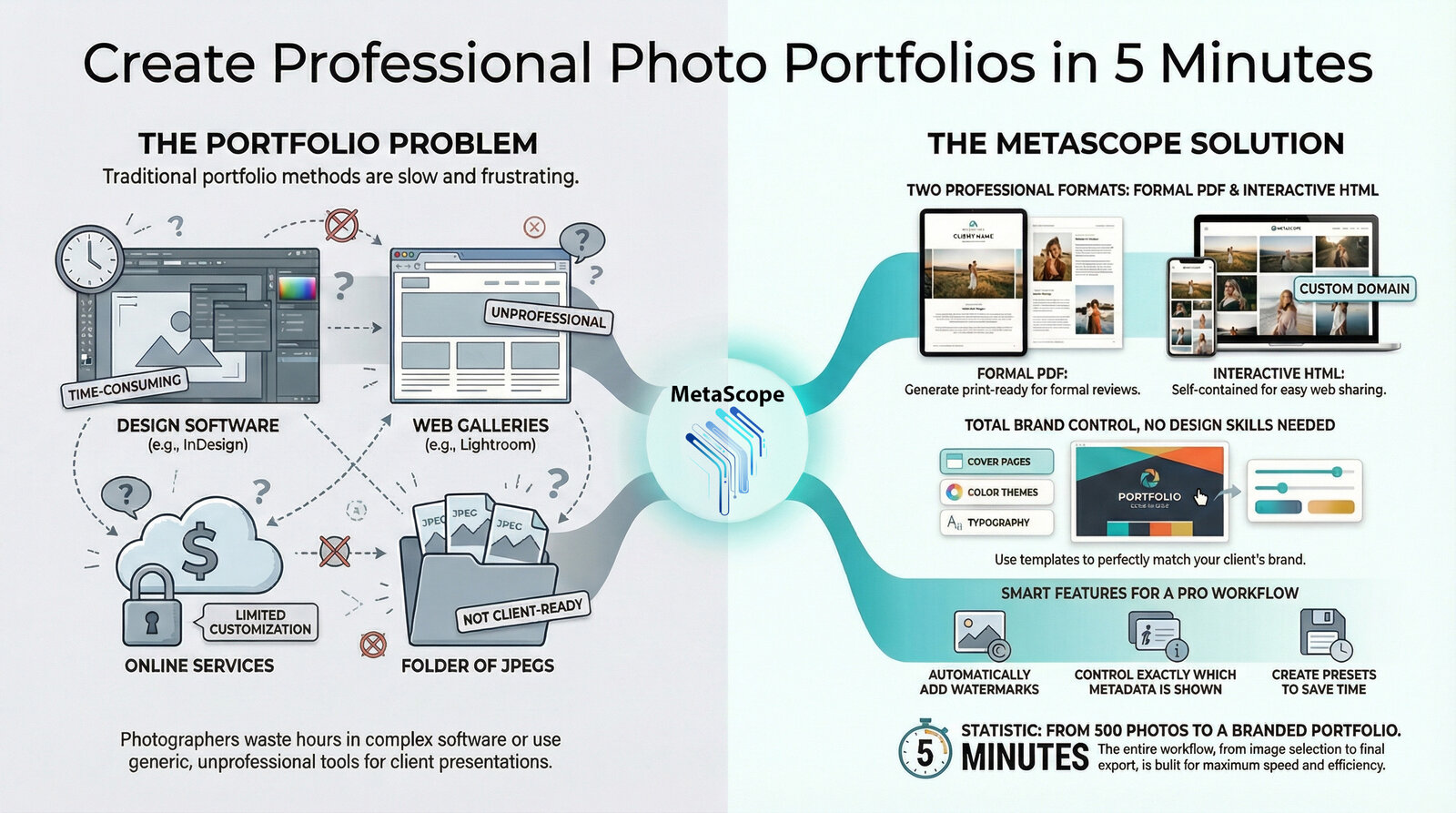
You already did the hard part. You shot the job, culled ruthlessly, and landed on 50 images you are proud to show.
Then comes the part nobody enjoys: turning those selects into something a client can actually review, approve, and share.
MetaScope solves that last mile. It turns a tight selection into a branded PDF or a self-contained HTML gallery in minutes, without asking you to become a part-time layout designer.
The Problem MetaScope Actually Solves
Most portfolio workflows break down in one of three ways.
You can move fast, but everything looks generic.
You can make it beautiful, but you lose an evening to layout work.
Or you can share quickly, but the delivery feels improvised and fragile (missing files, broken links, clients who cannot open the format you sent).
MetaScope is built for the moment after culling: professional output, consistent branding, and metadata that works for you instead of against you.
User Stories
1. The Wedding Photographer Who Needs Proofs by Tonight
You finish a wedding edit at 7 PM. The couple expects a proof gallery the same day.
In MetaScope, you select the 50 keeps, choose a “Wedding Delivery” metadata preset, apply a proof watermark, and export.
You send a PDF for the archive-friendly record and an HTML gallery for frictionless viewing on phones and tablets. One selection, two deliverables, both branded.
2. The Commercial Shooter Delivering to a Brand Team
A brand client cares about consistency. The typography, colors, and cover page need to match their visual identity.
MetaScope lets you build a client template once, then reuse it every time. Your exports stop looking like “whatever Lightroom generated” and start looking like a deliverable your client can forward internally without apology.
3. The Archivist Who Needs Metadata to Be Visible and Correct
A portfolio is not just images. Sometimes it is provenance, usage rights, caption accuracy, and location data.
MetaScope treats metadata as first-class content. You decide what appears under each image, and you can keep technical fields for internal review while publishing only descriptive fields for client-facing copies.
From Selects to a Portfolio in Minutes
MetaScope’s portfolio workflow is designed to feel like macOS. Pick your files, choose a preset, export a finished artifact.
No external dependencies. No folder chaos. No “it works on my machine.”
Step 1: Start With a Cover That Looks Intentional
A portfolio is judged in the first five seconds. A cover page gives you control over that moment.
In MetaScope you can add a title, creator details, and client context, plus a logo and an auto-generated summary (image count, date, total size). The result reads like a professional handoff, not a quick share.
Step 2: Set Typography Once, Reuse Forever
Typography should not be a recurring decision.
MetaScope lets you define styles for headings, body text, and metadata. Once you dial in the look, you keep using it across jobs. The output stays consistent, even when the projects change.
If you have ever printed a PDF and thought “this felt larger on screen,” you will appreciate having PDF-specific scaling so type reads correctly when it matters.
Step 3: Match Color to the Job, Not Your Mood
Some portfolios need gallery-white minimalism. Others want a dark, high-contrast presentation that feels cinematic.
MetaScope uses theme-based styling, so you can keep a set of looks and apply them intentionally per client or genre. You can even package themes for reuse across machines, which matters if you work between a studio Mac and a laptop.
PDF Portfolios That Hold Up in Real Client Work
PDF is still the most reliable format for formal review, printing, and archiving. The difference is whether the PDF feels like a document you authored or a contact sheet you exported.
MetaScope produces PDFs with a predictable structure: cover, image pages, captions and metadata, optional page numbers, optional watermarking.
Metadata, On Your Terms
This is where MetaScope’s DNA shows.
You can choose exactly which fields appear beneath each image using presets that match the job. For example, a wedding proof can show date and location, while a technical portfolio can include exposure details for a lighting review.
If you want to be explicit about what is included, you can even document the visible fields in your workflow notes:
Preset: Wedding Delivery
Includes: Date, Location, Caption
Excludes: ISO, Aperture, Shutter Speed
Watermarking That Behaves Like a Professional Proof
Proofs should be viewable, but not reusable.
MetaScope watermarks render into the exported output so the mark persists in the file a client receives. You control placement and opacity, and you can keep it subtle enough to respect the images while still protecting them.
HTML Galleries That Share Like a Single File
HTML is the fastest way to get a client viewing on any device, especially when “open this link” beats “download this app.”
MetaScope’s standout choice here is the self-contained export. Instead of sending a folder full of images and hoping nothing breaks, you export one HTML file that carries the gallery with it.
That means fewer support emails and fewer “I only see broken thumbnails” moments.
When you enable interactivity, the gallery becomes easier to review at speed. Search, sort, and filter make a 50-image selection feel manageable, and the lightbox keeps the viewing experience clean.
A Real Example Workflow: Wedding Delivery
You have 50 selects ready for client review.
In MetaScope:
- You select the images in the grid.
- You choose PDF and HTML export.
- You apply a wedding cover template with your studio branding.
- You pick a clean theme and a readable typography set.
- You choose a client-facing metadata preset.
- You enable a proof watermark.
- You export two files that are ready to send.
The key is not that MetaScope exports files. Plenty of apps do that.
The key is that MetaScope produces deliverables that look consistent, feel intentional, and require almost no overhead once your presets are set.
Why This Matters for New MetaScope Users
MetaScope is a metadata tool at heart. That is exactly why its portfolio exports land differently.
Your captions are correct because your IPTC is correct.
Your deliverables stay consistent because templates and presets are reusable.
Your handoff feels professional because the output is designed, not improvised.
If you are tired of rebuilding the same “portfolio package” from scratch for every job, MetaScope turns that repetition into a workflow you can trust.

MetaScope is available for macOS. Cover page templates and custom color themes are included in the Pro tier.