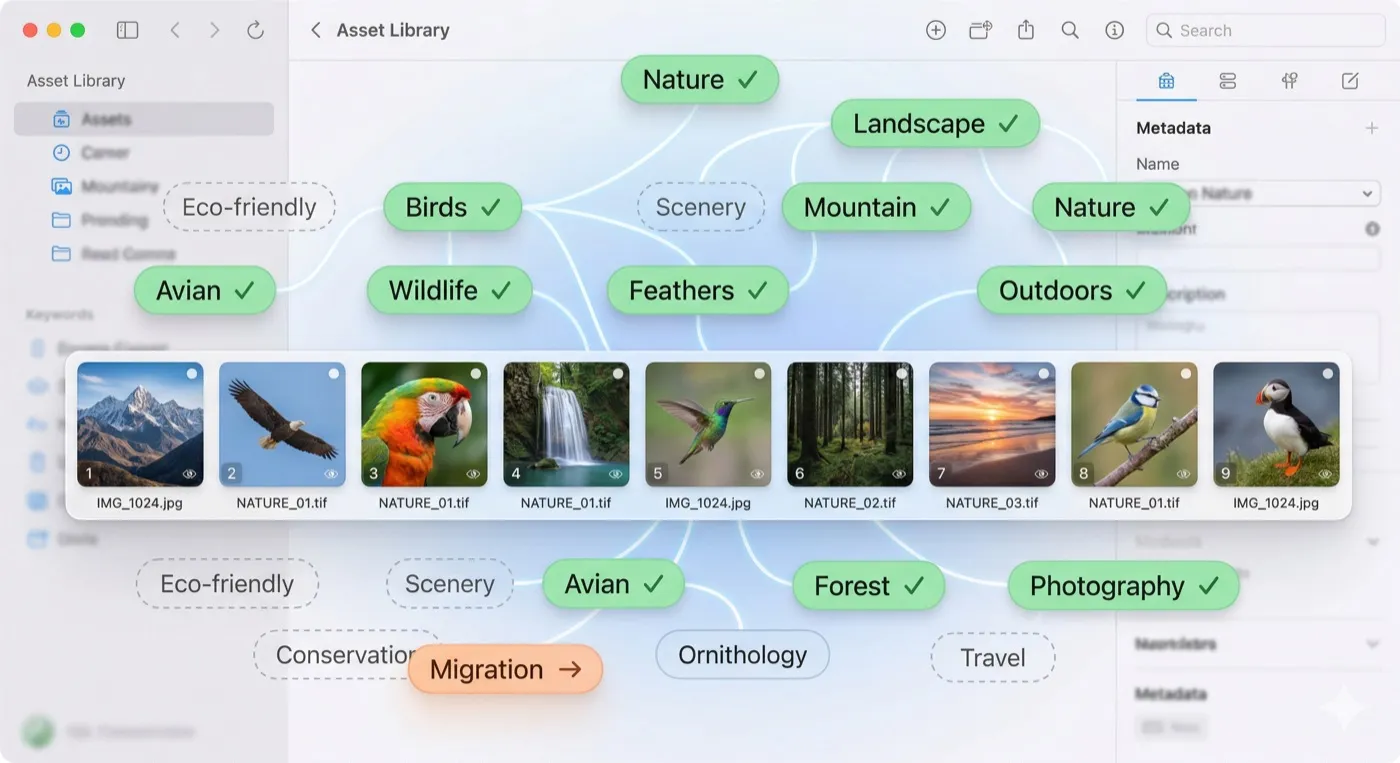
MetaScope started as a metadata inspector. With v1.3.0, it takes a significant step toward becoming a serious primary keywording tool -one that can hold its own against dedicated applications like Photo Mechanic or Lightroom for photographers, digital asset managers, and archivists who care deeply about metadata quality.
This release delivers four major keyword capabilities that address long-standing workflow gaps: a dedicated batch keyword editor, portable synonyms, deeper search integration, and significant hardening of the keyword rules engine.
Batch Keyword Editor
The single most requested improvement from professional users was simple to state and harder to build: apply the same keywords to a batch of files at once.
Until now, MetaScope’s metadata editor accepted one file at a time. Tagging a set of 30 images from a ceremony shoot meant opening the editor 30 times. That is not a workflow -it is a tax on your time.
The new Batch Keyword Editor (Cmd+Shift+K) is a dedicated window built specifically for this. Select any number of files in the browser, invoke the editor, and you are working across the entire selection at once.
What you see
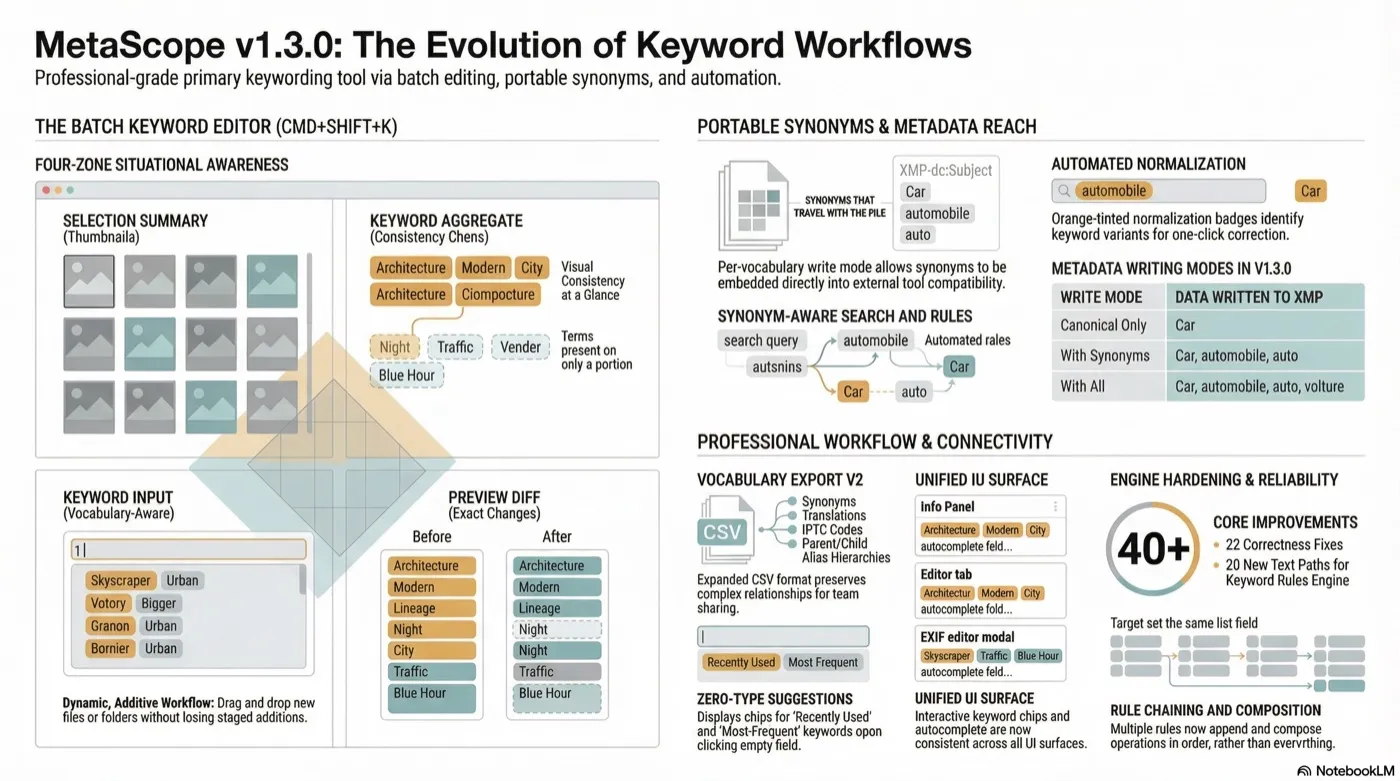
The editor is organized into four zones that give you full situational awareness:
Selection summary -A thumbnail strip and file count at the top so you always know what you are editing. If you realize you missed a folder, you do not need to close and start over.
Keyword aggregate -Every unique keyword across your selection is shown as a chip, with a count of how many files carry it. A chip showing “Wedding 23/23” is solid -it is on every file. A chip showing “Church 18/23” has a dashed border -it is on some files. At a glance, you see exactly where your tagging is consistent and where it is not.
Keyword input -The same vocabulary-aware input field from single-file editing. As you type, autocomplete draws from your controlled vocabularies, your personal history, and synonym relationships. Tab or Return accepts a suggestion and stages it for addition. Click an existing chip in the aggregate to stage it for removal.
Preview -Before you commit anything, the editor shows you a per-file diff: which files gain which keywords, which lose them. No surprises.
Works the way you work
The editor integrates with every access point you would expect:
- Context menu: right-click any selection and choose “Edit Keywords…”
- Toolbar: tag icon button in the Pro Features cluster
- Menu bar: Tools > Edit Keywords…
- Keyboard: Cmd+Shift+K
It also handles single-file selections -there is no “select more than one first” barrier. If you want the focused keyword editing surface for a single file, open it.
Add files while the editor is open
One of the more practical refinements: you do not have to plan your entire selection before opening the editor. A file drop zone lets you drag files or folders directly onto the editor window, or use the “Add Files…” and “Add Folder…” buttons. Newly added files merge into the session -your staged additions and removals are preserved. Duplicates are deduplicated automatically.
This means your workflow can be additive. Start with the obvious group, apply the shared terms, then pull in the next group without losing your place.
Portable Synonyms
MetaScope has had controlled vocabulary support for some time. Vocabularies let you define canonical terms, build hierarchies, assign IPTC codes, and even define synonym variants of each term. The autocomplete engine has always used synonyms to help you find the right canonical term -type “automobile” and get suggested “Car.”
But synonyms stopped there. They never reached the file. They were invisible to external tools, DAMs, stock agencies, and AI pipelines. They did not participate in search. A user who invested time building a vocabulary with 500 terms and 2,000 synonyms got autocomplete assistance -and nothing more.
v1.3.0 changes that.
Synonyms can now travel with the file
A new per-vocabulary synonym write mode (configured in Settings > Keywords) controls what gets written to XMP-dc:Subject when you apply a vocabulary term:
| Mode | What is written |
|---|---|
| Canonical only (default) | Car |
| With synonyms | Car, automobile, auto |
| With all (synonyms + translations) | Car, automobile, auto, voiture |
This is entirely opt-in. Existing vocabularies use canonical-only mode by default, so your current files are not affected unless you change the setting. When you do, any vocabulary term you apply will embed its synonym network directly in the file -making it discoverable by external search engines, licensable by stock agencies, and legible to AI classifiers without any extra work on your part.
Search now understands synonyms
The synonym-aware search integration means that searching for “automobile” in MetaScope will find files tagged “Car” -because MetaScope knows they are related terms in your vocabulary. You do not have to remember which canonical form you used on a given day. You do not have to run multiple searches. You find what you are looking for.
Normalization: catch variants as they come in
Files from Lightroom, Photo Mechanic, or collaborators may use synonym variants of your canonical terms. Previously, MetaScope displayed them as-is -“automobile” would just be “automobile,” with no indication that your vocabulary has a canonical term for it.
Now, when MetaScope recognizes that a keyword you have typed or imported is a known synonym of a vocabulary term, it shows a normalization badge -an orange-tinted chip with an arrow icon. The badge means: this is valid, but the canonical form is different. Click the checkmark to replace it in one action.
For batch normalization across a large collection, a single-click workflow normalizes all identified variants in a selection at once.
Keyword rules fire on synonyms too
If you use keyword rules to drive metadata automation -“if keyword contains X, write Y to field Z” -those rules now optionally match through synonym relationships. A rule configured on “Car” with the new “Match Synonyms” toggle enabled will also fire when a file carries “automobile,” “auto,” or any other registered synonym.
The rule editor shows a synonym preview listing exactly which variants will trigger the rule. New rules have “Match Synonyms” on by default; existing rules are unchanged unless you enable it.
Vocabulary Export v2
The CSV vocabulary export format has been expanded. Previously, translations were omitted from CSV -if you shared a vocabulary via CSV, the recipient lost all translation data and had to reconstruct it manually. The new format preserves:
- Synonyms -semicolon-separated list in the synonyms column (this was present before)
- Translations -ISO 639-1 language codes mapped to translated terms
- IPTC codes -subject and scene codes
- Alias relationships -parent/child hierarchy preserved through parent column
This makes CSV a viable format for team vocabulary sharing, not just a rough export. Full-fidelity interchange still uses the native JSON format, but CSV is now significantly more complete for professional workflows.
Workflow Improvements from Real-World Testing
Several improvements in this release came directly from hands-on feedback from Oliver, a professional user managing large photo collections with MetaScope as his primary keywording tool.
Recent and frequent keyword suggestions on field focus
Click into an empty keyword field and you immediately see suggestions. You do not need to type anything first. Your most recently used and most frequently used terms appear right away, drawn from your personal usage history. This makes re-applying the previous session’s keywords as fast as clicking a chip.
Vocabulary Browser wiring
The vocabulary browser now connects directly to whichever keyword field you opened it from. Double-click a term in the browser (or select and press Return) and it inserts directly into the field. No copy-paste required.
When you open the browser standalone via Cmd+Opt+V, it displays a “Browse Only” badge in the header to make the mode clear -in standalone mode it is for reference and exploration, not direct insertion.
Consistent keyword chips across all surfaces
Keyword fields across all three editing surfaces -the info panel Favorites tab, the Editor tab, and the full EXIF editor modal -now show the same interactive chip UI with autocomplete, vocabulary browsing, synonym enrichment, and normalization badges. Previously two of the three surfaces used a plain text area. The chip experience is now consistent regardless of where you edit.
Keyword Rules Hardening
The keyword rules engine received two rounds of focused audit in this release cycle, resulting in more than 22 correctness fixes and 20 new tests covering previously untested paths.
Key fixes:
- XMP:Subject was not being read -files using XMP-only keyword storage showed “No keywords found” in the editor. Fixed.
- Field ID “country” corrected to “countryName” -example rules and vocabulary suggestions referenced a field ID that does not exist in the registry. Rules using this field silently wrote nothing; they now correctly write CountryName metadata.
- List operations now compose -when multiple rules target the same list field, append/remove/replace operations are now chained in order. Previously the last rule silently won. All applicable rules now contribute.
- Manual applies now appear in the activity log -manually triggering “Apply Keyword Rules” now creates an entry in the activity log. Previously only auto-apply was tracked.
- Synonym matching now respects the rule’s match kind -synonym traversal is correctly scoped to the matching mode the rule is configured for.
A Complete Keywording Surface
Taken together, these capabilities represent a significant maturation of MetaScope’s keywording story:
- Start a session: Select 30-50 files, open the Batch Keyword Editor (Cmd+Shift+K), review the aggregate, add shared terms, preview the diffs, apply.
- Stay consistent: Normalization badges surface variant terms the moment they appear, and one click brings them in line with your vocabulary.
- Reach further: Synonym-enriched writes mean external tools and search engines see the full breadth of your vocabulary relationships, not just the canonical term you happened to type.
- Automate downstream: Keyword rules that match through synonyms let your automation layer work regardless of how a file was originally tagged.
MetaScope v1.3.0 is available now on the Mac App Store. Check out the full release notes for the complete changelog.
MetaScope Pro is required for controlled vocabulary features, batch keyword editing, and keyword rules. A Pro subscription can be started from within the app.
Learn more about MetaScope, the professional metadata editor for macOS.