Prompt library for Mac and iPhone
Your best prompts, one click away.
A native prompt library for Mac and iPhone.
Search, copy, and paste into any app. PromptLatch keeps your collection on your device, with optional iCloud sync under your own Apple ID and no account to create.
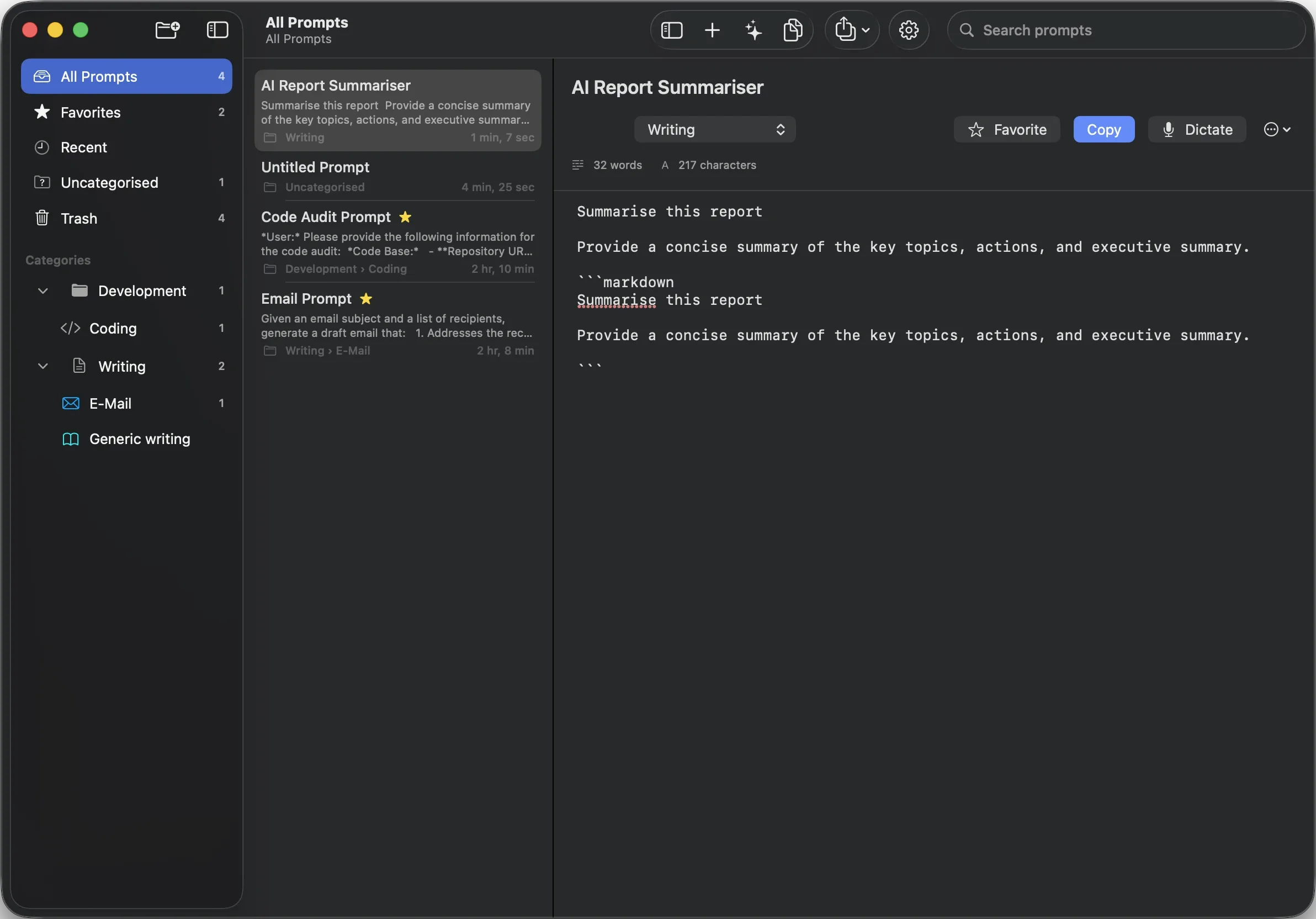
Your collection, in a native iPhone app.
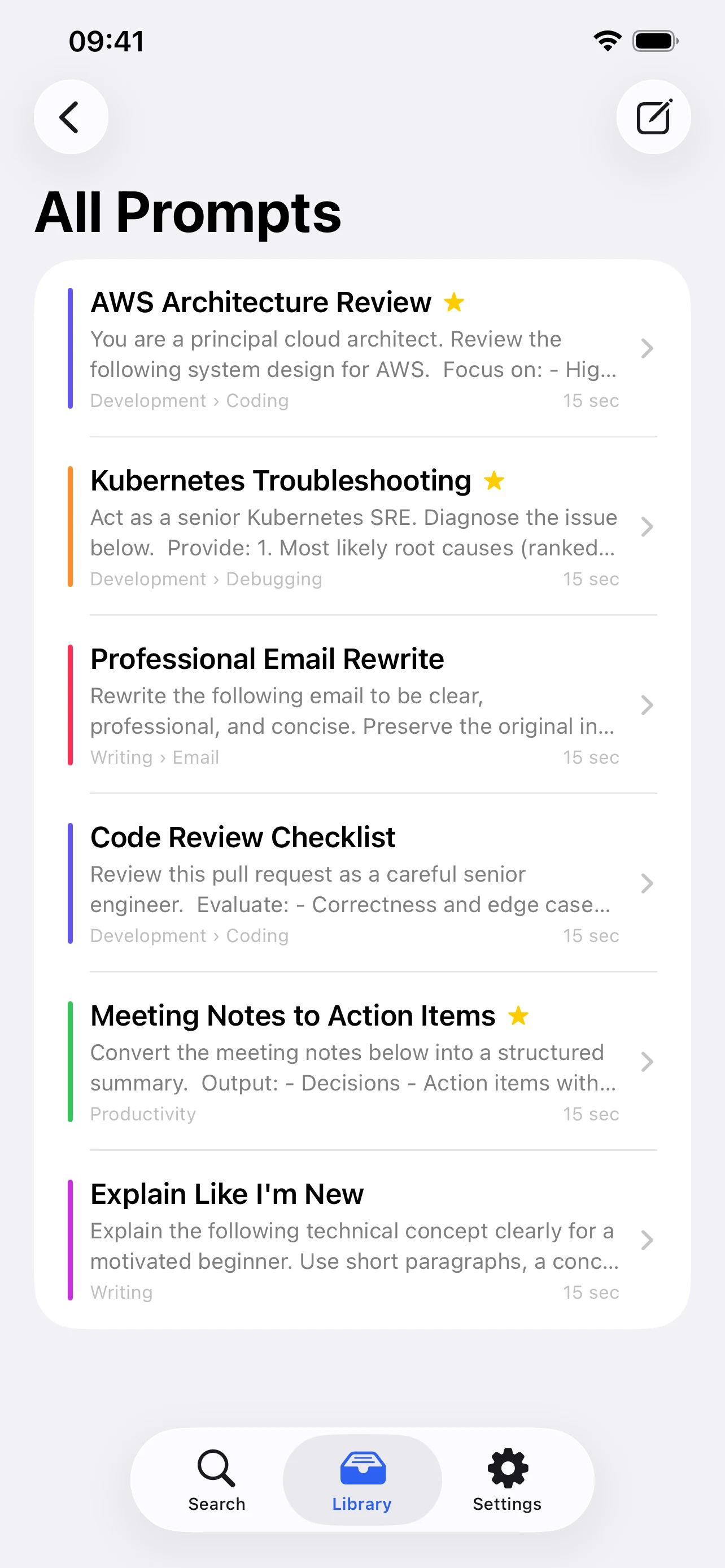
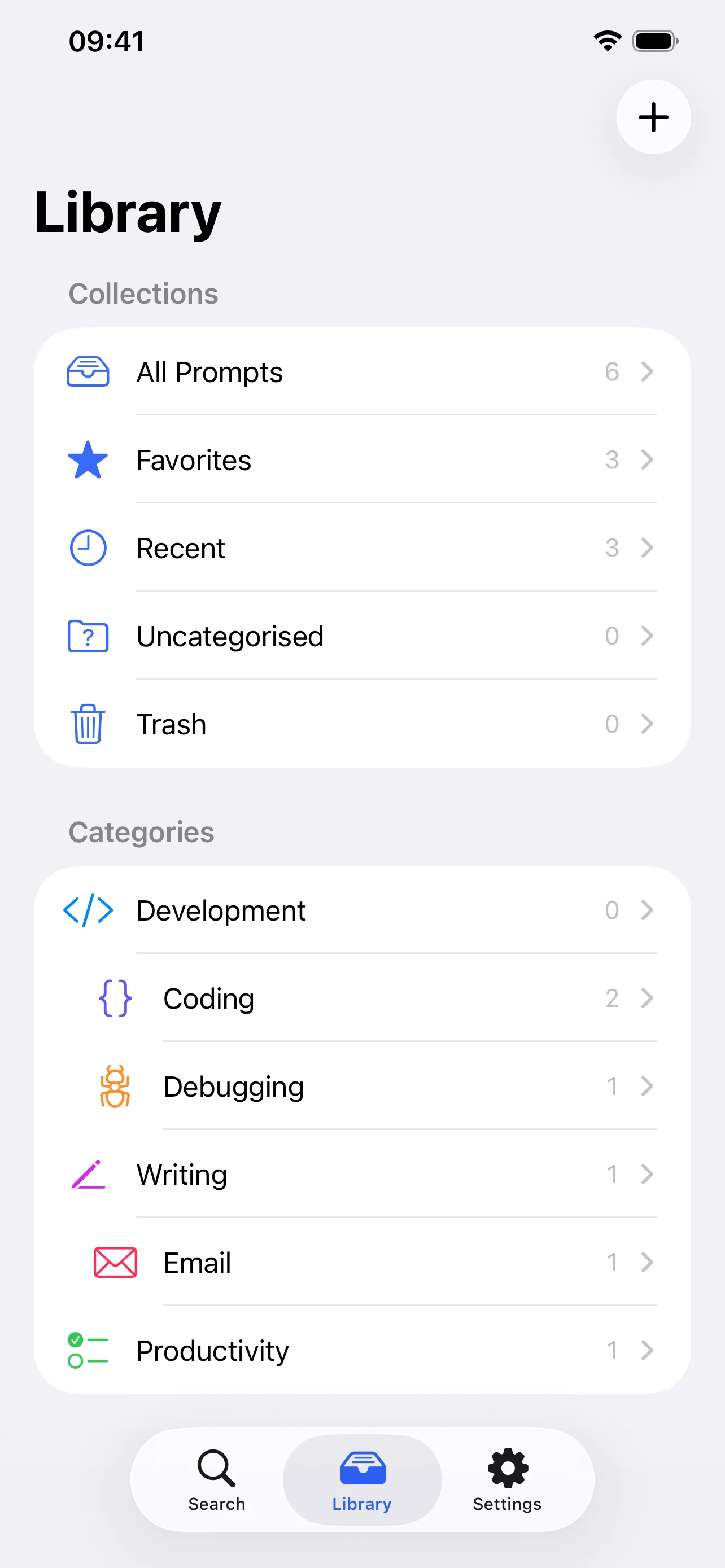
-
The library you know, on iPhone
Browse the familiar library structure on iPhone: all prompts, favorites, recent items, categories, and subcategories.
-
One unlock, both devices
The same unlock covers Mac and iPhone, so Restore Purchase brings an unlock you bought on Mac to your iPhone.


A prompt library that lives where you already work.
PromptLatch is a native macOS menu-bar app for storing, organizing, and copying reusable AI prompts. It sits in the menu bar for instant retrieval, and opens into a full Library window when you want to organize, edit, and refine.
The prompts that actually work get reused. Most of them end up scattered: half in a notes app, half buried in old chat transcripts, a few in a scratch file nobody can find twice. PromptLatch gives them one home and puts that home one click from wherever you are.
Built for people who reuse prompts every day: writers, developers, researchers, and anyone whose good prompts currently live in a notes file they have to go looking for.
Fast to reach, calm to organize, private by default.
-
Menu-bar speed
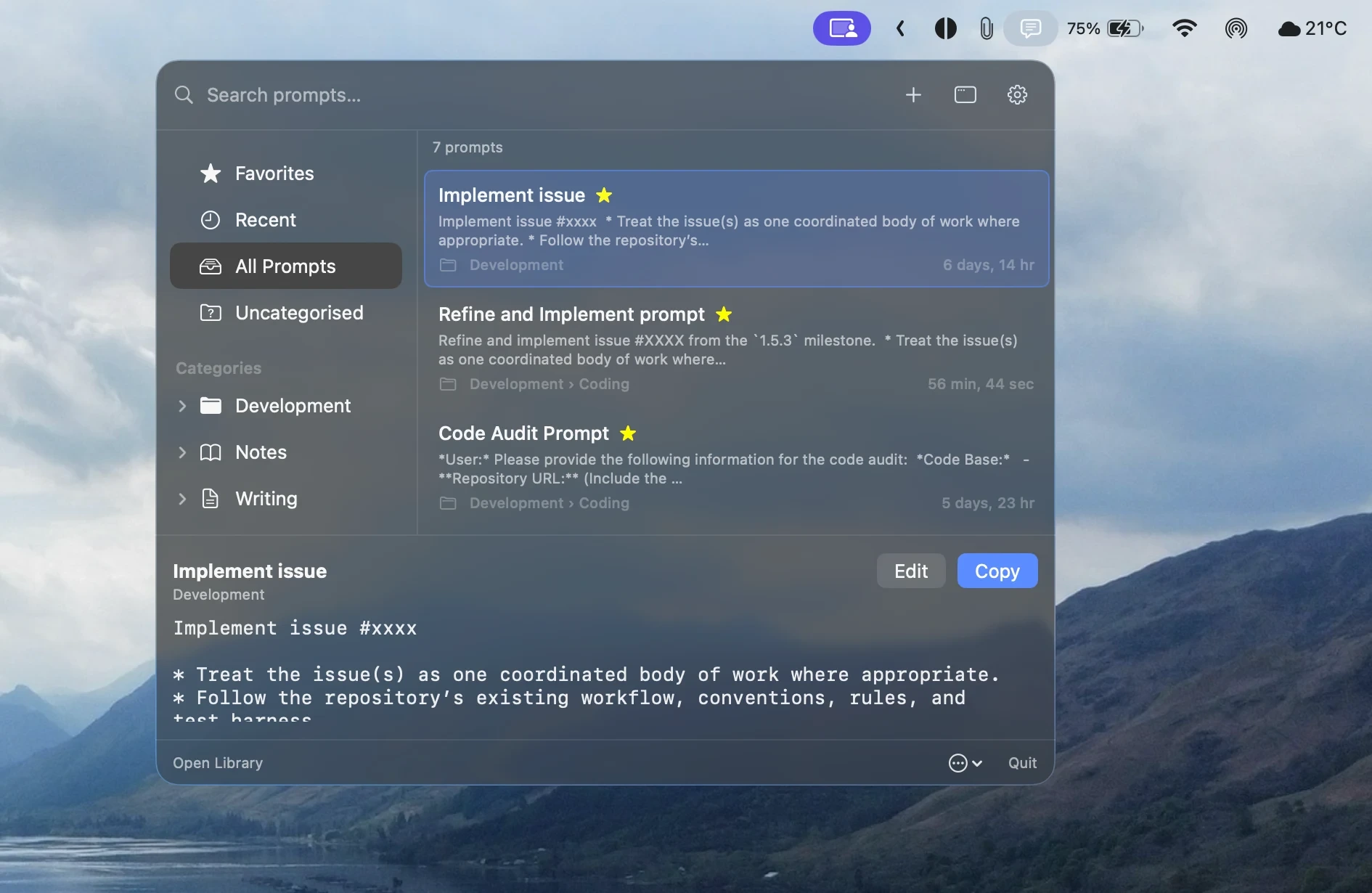
Click the status item, type a few letters, press Return. The prompt is on your clipboard and ready to paste into whatever you were already doing. Optional close-after-copy keeps you in flow.
-
A library that scales
Categories and subcategories, drag to reorder, favorites, recent, and a trash you can recover from. The three-column Library window is built for the day your collection outgrows a notes file.
-
Built for writing prompts
The editor is a real native text view, not a styled box. macOS Writing Tools, spelling, and grammar work as they do everywhere else, and you can dictate a draft straight into the body.
-
Local-first by design
Your library lives on your device. Turn on iCloud only if you want it, and sync runs through Apple CloudKit under your own Apple ID. There is no PromptLatch account and no PromptLatch server.
Save it once. Find it in seconds. Paste it anywhere.
-
Step 1
Save
Capture the prompts you already reuse across AI tools and chat, the ones currently scattered through notes, snippets, and old conversations.
-
Step 2
Find
Search from the menu bar. Matching is case and diacritic insensitive, and results are ranked by relevance rather than by the order you happened to add things.
-
Step 3
Copy
Return, or a double-click, puts the prompt on the clipboard. Paste it wherever you work. No retyping, no hunting back through history.
Built the way a Mac utility should be built.
PromptLatch is menu-bar first. There is no Dock icon while only the status item is active. Open the Library or Settings and the app promotes itself, close the Library and it steps back out of the way.
The editor uses a real NSTextView, so Writing Tools, spelling, grammar, and
system Dictation behave exactly as they do in every other Mac app, and autosave means
nothing is lost mid-session. Choose a monospaced, system, or serif editor font and set the
size to suit the work, with six font families and seven sizes across the Library, menu-bar
preview, and Prompt Assistant. Appearance follows System, Light, or Dark, and PromptLatch
can launch at login when you want it ready every session.
- ⌘N New prompt
- ⌘L Open Library
- ⇧⌘C Copy prompt
- ⇧⌘F Toggle favorite
- ⌘⌫ Move to trash
- Return Copy selected, in the menu-bar panel
Added in 1.0.1
More ways to create, organize, and make the library your own.
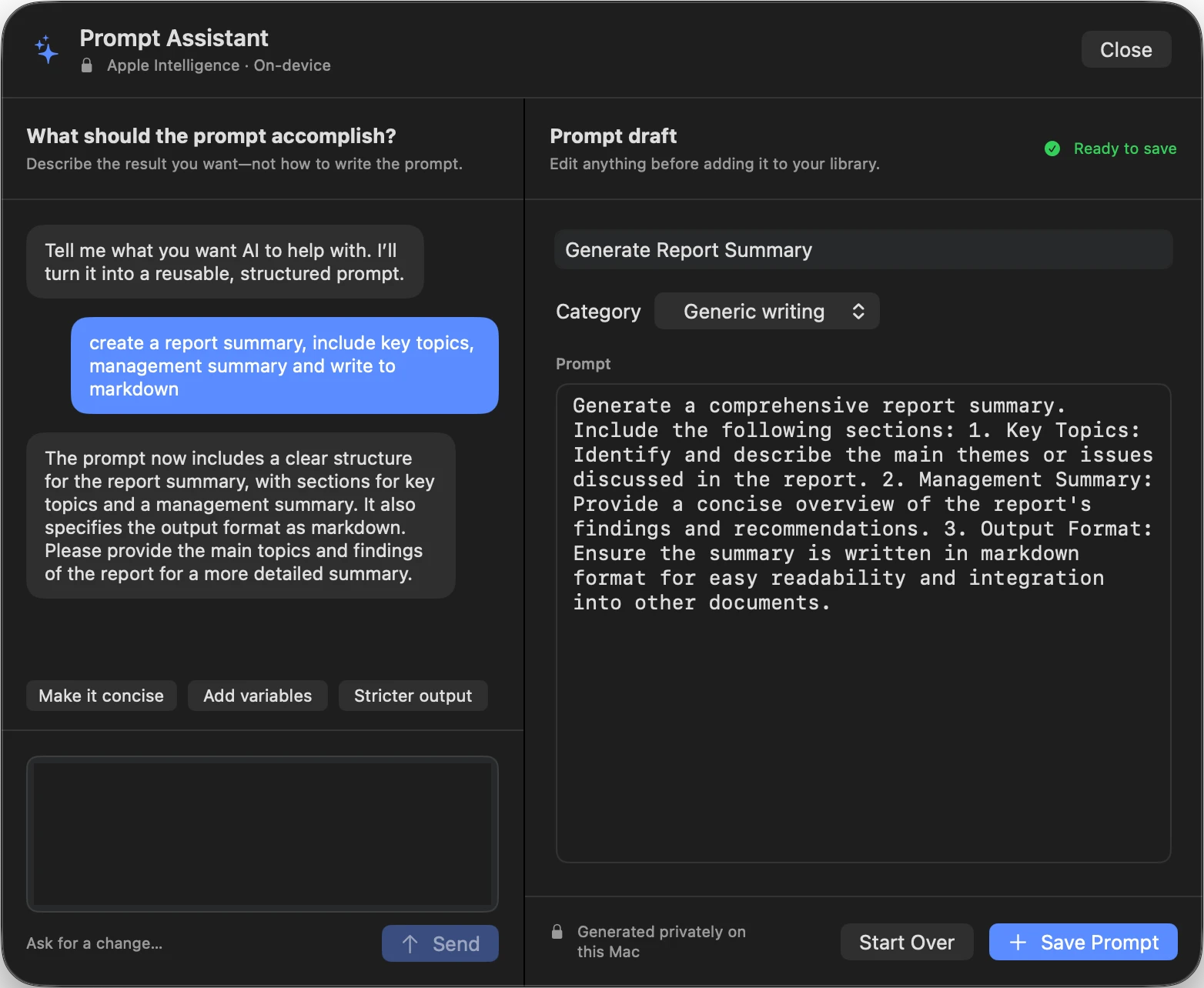
PromptLatch 1.0.1 adds an on-device Prompt Assistant, more personal categories, more typography choices, and App Store offer-code redemption.
-
Prompt Assistant
Turn a conversation into a structured, reusable prompt draft using Apple Intelligence privately on a compatible Mac. Requires macOS 26, Apple Intelligence enabled, and supported hardware.
-
Personal categories
Choose and edit category icons and accent colors, with those choices preserved through library export, import, and migration.
-
More typography
Choose from six prompt font families and seven sizes across the Library editor, menu-bar preview, and Prompt Assistant.
-
Offer-code redemption
Redeem App Store offer codes directly from the unlock screen and refresh the entitlement without leaving PromptLatch.
Your prompts are yours, and they stay on your devices.
- No PromptLatch account, and no sign-in of any kind.
- No continuous clipboard monitoring, PromptLatch writes only when you copy.
- Dictation is Apple’s own, PromptLatch does no speech recognition itself.
- No third-party analytics or advertising SDKs.
- Optional iCloud sync, off unless you turn it on.
- Prompt Assistant uses Apple Intelligence on-device and keeps generation on your Mac.
Prompt Assistant uses Apple Intelligence on-device on compatible Macs. Writing Tools and Dictation are also provided by macOS itself, so PromptLatch never sends prompt contents to a third-party AI service. Full detail is in the PromptLatch privacy policy.
Free to start. One payment if you keep it.
-
Try it
14 days free
On Mac and iPhone, the download is free and the trial is the complete app, not a reduced version. Build a real library, use it in your actual work for two weeks, and decide from experience rather than from a feature list.
-
Then unlock it
€2,99 once
A single in-app purchase, not a subscription. No monthly charge, no renewal to remember, no tier to upgrade into. One unlock covers Mac and iPhone: Restore Purchase works on any Mac or iPhone signed in to the same Apple ID.
-
Or do not
Your prompts stay yours
On Mac, if you never unlock, the library you built during the trial stays readable. View, search, copy, edit, and export it for as long as you like. The unlock is what lets you add to it: creating and duplicating prompts, adding categories, and importing.
A prompt library is something you either use every day or abandon in a week, and two weeks of real use tells you which one it will be. If it sticks, one €2,99 unlock covers Mac and iPhone. Payment is handled by Apple, and local prices vary by region because of local taxes and App Store policies, so the exact amount is shown at checkout.


What you need to run it.
- Operating system
- macOS 15.0 or later, or iOS 18.0 or later on iPhone
- Hardware
- Any Apple Silicon or Intel Mac supported by macOS 15, or an iPhone with iOS 18
- Security
- App Sandbox and Hardened Runtime
- Sync
- Optional, Apple iCloud (CloudKit) under your Apple ID
- Portability
- JSON import and export
- Account
- None required
- Price
- Free download, 14-day trial, then a one-time €2,99 unlock that covers Mac and iPhone.
Common questions
What is PromptLatch?
PromptLatch is a native app for storing, organizing, and copying reusable prompts on Mac and iPhone. On Mac it lives in the menu bar for instant search and copy, and opens into a full Library window for organizing, editing, and refining your collection.
Where is my prompt library stored?
On your Mac or iPhone, using on-device storage. If you enable optional iCloud sync, your library syncs through Apple CloudKit under your own Apple ID. Zalo Design Studio does not operate a server that stores your library, and PromptLatch has no account.
Does PromptLatch send my prompts to an AI service?
No. PromptLatch does not call any third-party AI API with the contents of your prompts. On compatible Macs, Prompt Assistant uses Apple Intelligence on-device. Writing Tools and Dictation are also provided by macOS itself.
Can I back up or move my prompts?
Yes. PromptLatch imports and exports a documented JSON format. Import never overwrites silently: duplicates are skipped by id, or by a title and body fingerprint.
What does PromptLatch require?
On Mac, macOS 15 or later on any Apple Silicon or Intel Mac supported by macOS 15; on iPhone, iOS 18.0 or later. PromptLatch runs sandboxed, with the Hardened Runtime enabled on Mac.
How much does PromptLatch cost?
On Mac and iPhone, the download is free and includes a 14-day trial of the complete app. Keeping it costs EUR 2.99 (US$2.99) as a single in-app unlock, and one unlock covers both Mac and iPhone on the same Apple ID. It is not a subscription: there is no monthly charge and no renewal. Local prices vary by region because of local taxes and App Store policies, and the final price is shown at App Store checkout.
Is PromptLatch a subscription?
No. PromptLatch has a single one-time in-app purchase of EUR 2.99 after the 14-day free trial, on Mac and iPhone alike. There is no recurring charge, no tier to upgrade into, and no feature withheld behind a higher plan. Restore Purchase works on any Mac or iPhone signed in to the same Apple ID.
What happens to my prompts if I do not buy the unlock?
On Mac, the library you built during the trial stays readable. You can keep viewing, searching, copying, editing, and exporting your existing prompts for as long as you like. The one-time unlock is what lets you add to the library: creating prompts, duplicating them, adding categories, and importing. Nothing you already saved is locked away or deleted.
Stop hunting. Start reusing.
PromptLatch is available on Mac and iPhone. It is free to download and use for 14 days, then a one-time €2,99 for both if you keep it. No subscription and no PromptLatch account.
Built by Zalo Design Studio.